To add contents with border  |
1. Go to New Post page then select Edit Html and paste the code given below...
<div style="overflow: auto; text-align: center;"><table style="text-align: left; margin-left: auto; margin-right: auto;" border="1" cellpadding="0" cellspacing="0"><tbody><tr><td> your contents goes here </td></tr></tbody></table></div> |
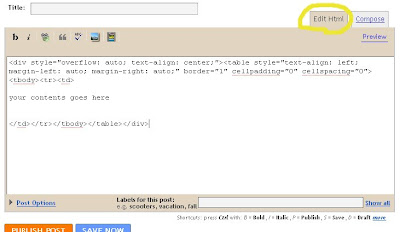
2. Now select Compose and start adding your contents under a cool border.You no need to increase or decrease the height or width of the border, it will automatically align itself based on the contents
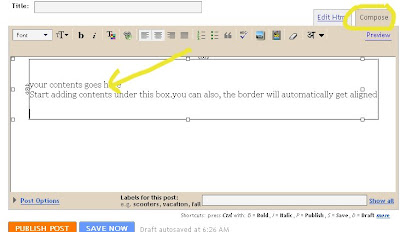
We are done..
This the way the content gonna look
This the way the content gonna look
To add contents with border |
Add content with border in blogger
HTML code to make the image scroll
| <marquee><img src="image.gif" width="120" height="82" alt="image"></marquee> <marquee><img src="circle.gif" width="120" height="82" alt="image">can add text here</marquee> |
This alternate behavior makes the text scroll with in the page itself, you can see the preview here
| <marquee behavior="alternate">alternate</marquee> |
This width option makes the text scroll within the width of 200 you can also mention height="200" if you are using the marquee direction="up" or "down"
| <marquee width="200">width 200</marquee> |
Change the direction of the text to move
| <marquee direction="up">Moving towards top</marquee> <marquee direction="down">Moving towards down</marquee> <marquee direction="right">Moving towards right</marquee> <marquee direction="left">Moving towards left</marquee> |
Change the background color of the text, Here #00ffff is the hexadecimal color code for aqua, click this link for more colors and there hexadecimal codes
| <marquee bgcolor="#00ffff">background color changed</marquee> |
Make the text or image scroll for 5 times then stop, you can change the no of times of scrolling by changing the no of loop
| <marquee loop="5">This makes the text to scroll 5 times</marquee> |
Changing the scrollamount changes the speed of the marquee. Increasing the value increases the speed
| <marquee scrollamount="1">scroll amount is set to 1</marquee> <marquee scrollamount="10">scroll amount is set to 10</marquee> <marquee scrollamount="20">scroll amount is set to 20</marquee> |
Here comes my fav, make the scrolling text stop on mouse over, it fine for displaying long text in a small space
| <marquee onmouseover=this.stop(); onmouseout=this.start();>here goes your text which is to stops on mouse over</marquee> |
Finally adding more effects to a single text or image, u can add many attributes by adding them after a space
| <marquee onmouseover=this.stop(); onmouseout=this.start(); direction="up" height="100" bgcolor="#ff0000" behavior="alternate" scrollamount="5">TEXT WITH VARIOUS EFFECTS, YOU CAN ADD MORE ATTRIBUTES WITH A SPACE HOW I HAVE DONE</marquee> |